Getting Started with Agents — No Code Required
You don't need to be a coder to work with AI agents. It's as easy as installing Spotify or any other app on your computer. Here's how I got started, and what I actually built.
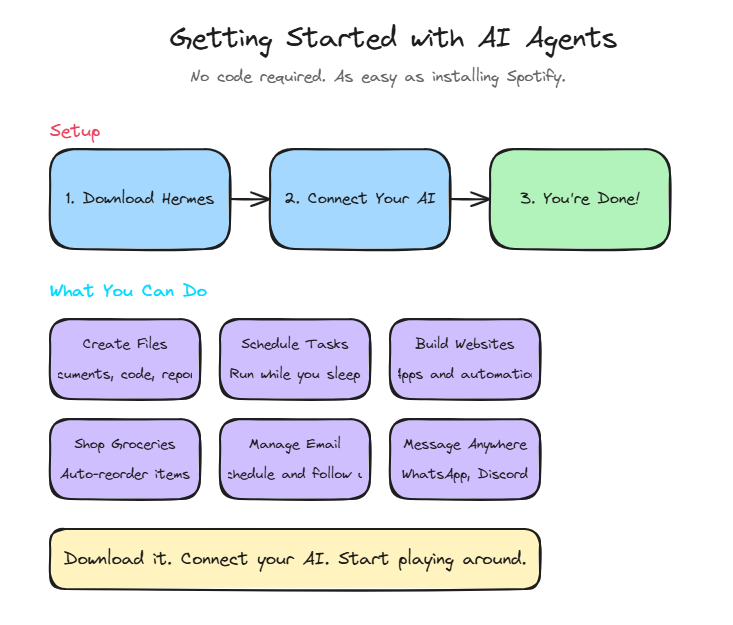
Getting started with agents doesn't have to be hard or scary. Nous Research has made our life very, very easy. But saying "just download Hermes and point it to your AI" doesn't really help, does it?
So let's take it step by step. You don't have to be a coder. This will be as easy as installing Spotify or any other app on your computer.
But Do You Need a Mac Mini? Or a Powerful Computer?
Before we go anywhere, let me address something you might be thinking: \"this sounds like I need expensive hardware.\"
You don't. And you never did.
Here's the thing - your computer is not doing the AI calculations. Think of it like Netflix. You don't need to store all the movies on your TV to watch them. You just stream the pieces you need, when you need them, and they play right there on your screen.
Agents work the same way. You give them a task, they use computers in the cloud (OpenAI's, Anthropic's, whoever's AI you're using) to do the thinking. Then they take those results and act on your own computer - create the file, send the email, build the website, whatever.
Your computer is just the interface. It's the screen you're watching Netflix on. The heavy lifting happens somewhere else.
Now - yes, you can run local models. They have pros and cons, and we'll go over those in another post. But even then? A Mac mini is not the answer. Don't let anyone push you into buying a Mac mini or any other \"AI computer.\" Use what you already have. If you have a computer that turns on, you have enough.
Step 1: Download Hermes Desktop App
Go to hermes-agent.nousresearch.com/desktop and download it. No more going into coding apps or terminals. Very straightforward — just click next, next, next as you would do with every other regular app you install.
Step 2: Connect Your AI
Once you're there, use what you already pay for — or even free options. You can create a new Nous Portal membership that comes with free models, or use ChatGPT, Claude, or whatever you already use. If you have ChatGPT, just use your email and password. The app will do all the heavy lifting. No API keys, no configuration, no anything — just like logging into your regular account.
Step 3: You're Done
Just start working with agents that have as much access as you want to your computer, your files, your email, your calendar — your whole digital life.
So What Can You Actually Do With It?
The question I get most is: what to do with agents, and why is it different from just regular ChatGPT?
Let's start with the latter. With ChatGPT or other web-based AI, you prompt, you get an answer, that's it. With an agent like Hermes, it can:
- Create files on your computer
- Create scheduled tasks that run overnight or while you're playing with your kids
- Keep track of your schedule and meetings
- Help you with workouts and planning
- Create apps and websites if you want
- Whatever you need, whenever you need it
What I Actually Built
The other question is: well, what do you actually do with it? That's the hardest and easiest question at the same time.
I started the same as you. Installed it, gave it access, but didn't really know what to do with it. So I asked Hermes: "What can you do with me?" It gave me a bazillion options. Most of them were red-taped by work so I couldn't use them. My life wasn't as busy as others so I didn't really need help scheduling things.
But then I just started using it instead of the web ChatGPT and started coming up with things:
- Created my website
- Created the Walmart automation so I don't worry about groceries anymore
- Had it research and contact companies for my wife's next all-girls trip
- Built a personal finance app to keep track of our budget
- Whatever else comes to mind — we just go through it together
Keep Experimenting
What keeps coming back to me is: keep experimenting. If you don't download the tool, you'll most likely never get ideas and definitely will never be able to actually learn how to use it.
The best way to figure out what works for you is to just start. Use it for something small, see what happens, and build from there.
You Don't Have to Sit at Your Computer
If you're like me and don't like sitting in front of the computer to do this all day, connect your agent to the messaging app you use most. WhatsApp, iMessage, Discord, Slack, email — whatever. Send it messages in traffic, while shopping, while sitting on the throne, whenever you get a minute.
A small prompt can have Hermes working as long as needed to finish the website, do the research, or whatever you need. You don't need to babysit it and look at a scary Matrix-looking terminal window. It will do everything seamlessly.
The Bottom Line
Getting started with AI agents is easier than you think. You don't need to code. You don't need technical skills. You just need to download it, connect your existing AI account, and start playing around.
The hardest part is just getting started. And now you know exactly how to do that.
If you need help getting started, just let me know!
FAQ
Do I need to know how to code?
No. The setup is as simple as installing any regular app. You use your existing AI accounts (ChatGPT, Claude, etc.) with just your email and password — no API keys or technical configuration needed.
What's the difference between ChatGPT and an AI agent?
With ChatGPT, you prompt and get an answer — that's it. With an agent like Hermes, it can take actions: create files, run scheduled tasks, access your calendar and email, build websites, automate your grocery shopping, and whatever else you need.
What did you actually build with it?
I created my portfolio website, built a Walmart grocery automation so I don't worry about shopping, had it research and plan a trip for my wife, built a personal finance app for our budget, and whatever else comes up. The key is just starting and experimenting.
Do I need to be at my computer all the time?
No. You can connect Hermes to WhatsApp, iMessage, Discord, Slack, or email. Send it a message while you're in traffic or on your break, and it will work on the task and let you know when it's done. No scary terminal windows required.